AI-powered QA services, explained in one picture
What AutoQALabs does, piece by piece. Our QA process from exploring your app to reporting results, the AutoQA Agent, continuous testing in your CI/CD, and the three ways to work with us.
People often ask us what an AI-powered QA service actually does all day. So we drew it. Here is everything we do for a client, in one picture, and what each part means for your releases.
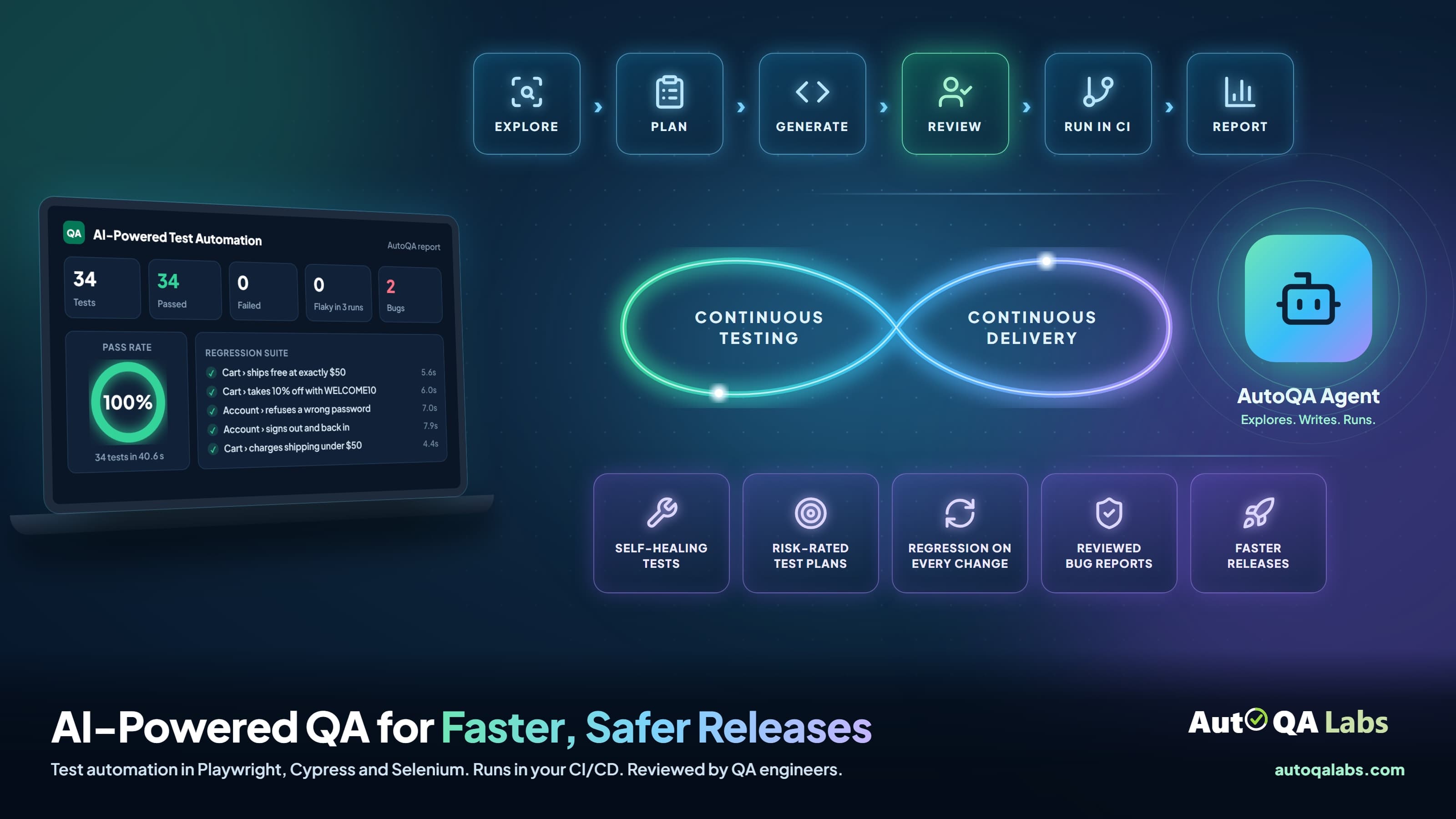
🔁 The pipeline: how every engagement runs
The row across the top is our process. It is the same for every client, so you always know what comes next.
- Explore. We map your application first: every page, flow and edge case worth testing. Our AutoQA Agent does the first pass, and a QA engineer checks what it finds.
- Plan. We write a test plan from that map, with every journey rated by how much it would hurt if it broke.
- Generate. AI drafts the test cases and turns them into automated tests in Playwright, Cypress or Selenium.
- Review. A QA engineer reviews every test before it reaches your repository. This is the step we will not skip, which is why it glows.
- Run in CI. The suite runs in your pipeline, in GitHub Actions, Jenkins or Azure DevOps, on every change or on a schedule.
- Report. Every run ends in a report your team can read in a minute.
📊 The report: what you get back
The laptop shows a real report, not a mock-up. It comes from our AutoQA Agent's run on our demo store: 34 tests written and passed, 0 failures, 0 flaky tests across 3 stability runs, and 2 bugs found.
♾️ Continuous testing, continuous delivery
The loop in the middle is the point of the whole service. Testing is not a phase at the end of a release. It runs alongside development, on every change, so delivery never waits on a manual regression pass.
🤖 The AutoQA Agent
The glowing icon on the right is our AutoQA Agent. It explores your application, writes the tests and runs them. It is fast, and it is never left alone: every test it writes is reviewed by a QA engineer before you see it. You can see it run on our demo store.
🧩 The five things that make it work
The tiles along the bottom are what you get on top of the tests themselves.
- Self-healing tests. When your UI changes, the agent repairs the broken tests, and it refuses to hide a real bug by "fixing" the test around it.
- Risk-rated test plans. Payment and checkout get tested before the 404 page. Every journey is rated by impact and likelihood.
- Regression on every change. The full suite runs in your pipeline, not once before a release when someone has time.
- Reviewed bug reports. Every bug comes with steps to reproduce, expected and actual results, evidence and a confidence rating.
- Faster releases. With the suite in your pipeline and one clear report, the release decision takes minutes, not a meeting.
For a side-by-side look at how this compares with a conventional in-house QA team, area by area and with real screenshots, see our detailed comparison.
🚀 Three ways to start
- Free test run. Our AutoQA Agent tests your staging app, and you get the findings in 48 hours. No commitment.
- Automation Project. We automate your test cases, or write them first if you have none, and hand you a suite you own, set up in your CI/CD.
- Managed QA Team. We run your QA every month: test cases, automation, testing of every release and bug reports, working alongside your developers.
All three are described on our services page.
Frequently asked questions
- What is an AI-powered QA service?
- A QA service where AI agents do the repetitive work, such as exploring an application and drafting automated tests, and QA engineers review everything the AI produces. You get the speed of automation with a person accountable for every test.
- Do AI-written tests need human review?
- Yes. At AutoQALabs a QA engineer reviews every test case and every bug report before it reaches your team, so a test never passes for the wrong reason and a bug report is always worth reading.
- Which test automation tools do you use?
- Playwright, Cypress or Selenium for automation, and GitHub Actions, Jenkins or Azure DevOps for CI/CD. If your team already uses one of them, we stay with it.
- What is continuous testing?
- Running your automated tests on every change in your CI/CD pipeline, instead of in one manual regression pass before a release. Problems surface while the change is still fresh, and releases stop waiting on QA.
- How can we try it?
- Start with a free test run. Our AutoQA Agent tests your staging application and you get the results in 48 hours.
Want to see the picture filled in with your own application? Our free test run puts our AutoQA Agent on your staging site and gives you the results in 48 hours.